This documentation is for Live Forms 7.3 Not for you? Earlier documentation is available too.
Security Managers
- Former user (Deleted)
- Former user (Deleted)
has a plugable security framework and offers a variety of built-in Security Managers. If you use the
Default Security Manager, a tenant admin can create users and roles directly in your
tenants. See the Manage Users and the Manage Roles for instructions on creating users and roles. Note that with LDAP Security Manager and Delegating Security Manager, groups are the equivalent of
roles.
also supports two types of LDAP Security Managers that pulls users and groups from your external Active Directory or Open LDAP system; a Delegating Security Manager when you are integrating
with Confluence ; a Database Container Security Manager that pulls users and groups from your external users database; a SAML Security manager that allows enterprises to take advantage of Internet Single sign On and custom security managers that lets you integrate with a security manager that you build yourself.
- frevvo Security Managers are an Add on feature with additional costs.
- frevvo only supports/certifies Security Managers when Live Forms is running in the Apache Tomcat container. Refer to our Supported Platforms for the list of Application Servers supported/certified by frevvo.
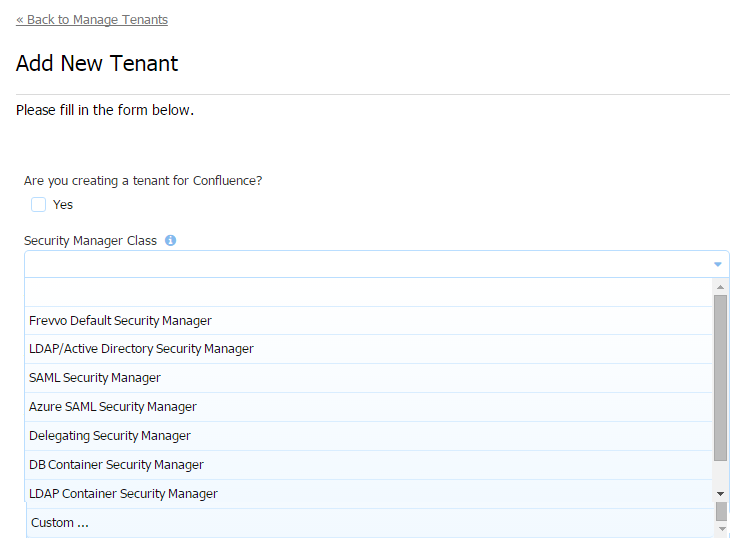
- frevvo Default Security Manager -
is responsible for authentication/authorization and managing users/roles. This is the default option. Your tenant will be created with this security manager if no other choice is selected.
- LDAP Active Directory Security Manager - The user is authenticated outside
- SAML Security Manager - This security manager allows the exchange of authentication and authorization data between an identity provider of your choice (ex:Shiboleth) and a service provider (frevvo). SSO is supported. Although this security manager can be used on-premise it is primarily meant for cloud tenants who use LDAP but do not want to expose it over the internet.
- Azure SAML Security Manager - This security manager uses SAML in Authentication Only mode and the Active Directory available in the Microsoft Cloud solution, Azure. Integration with the Azure API enables
- Delegating Security Manager - this is the Security Manger needed for Confluence integration.
- DB Container Security Manager - Authentication is the container's responsibility, but
- LDAP Container Security Manager - This is exactly the same as the DB Container Security Manager but LDAP instead of DB. Authentication is the container's responsibility.
- Custom - Container managed security manager used when there is a requirement for a container to handle authentication.
Which Security Manager do I choose?
Many frevvo customers use the Default Security Manager. All tenants are initially created with this Security Manager. It is the simplest security manager because it does not require integration with an external IDP. Users/roles are managed by the tenant admin.
offers additional Security Managers, implemented to industry standards, that may be more compatible with your environment. You must have the expertise for setting up your security infrastructure in such a way that whatever choice you make (cloud, ldap, saml, azure) is in fact secure and in compliance with any/all of your auditing requirements.
Selecting a Security Manager for your tenant is a very important decision. The table helps you make the choice.
| LDAP | SAML | Azure | |
|---|---|---|---|
| Cloud or on-premise | Both - Some organizations do not want to expose LDAP to the internet so they choose on-premise. Read how LDAPs in the cloud is secure. | Both - Primarily used for cloud tenants who do not want to expose their LDAP directly to the internet | Both - provides a simple and secure way to access identity management (azure AD) in the cloud |
Are Uses/Roles automatically synchronizied with your Live Forms tenant(s) ? | Yes - Manual user/role sync (via frevvo csv upload for example) is not required. The frevvo server automatically gets users & roles from LDAP. | No - if “auth only” mode selected - Users/Roles must be created in your tenant manually. The CSV upload is a good way to do this. Partial sync if discovery mode ( “auth only” off). User details and user’s roles are automatically discovered each time the user logs into the tenant. Thus the tenant can get out of sync with your IDP therefore manual or automated csv uploads on a regular basis are still recommended. | Yes - Manual user/role sync (via frevvo csv upload for example) is not required. The frevvo server automatically gets users & roles from Azure AD. |
| Single Sign On | Cloud - not available In-house - In-house - Must configure IIS using the IIS to Tomcat Connector | Yes | Yes |
| Authentication Only Mode Choice | No - You must change your IDP (LDAP in this case) to have roles you need in your frevvo workflow if they do not already exist. All user information is maintained in LDAP | Yes | Yes |
| Authentication Only = Yes | Not Supported | SAML handles authentication only - roles/users managed & maintained via the tenant Users/Roles UI. Changes made via the tenant Users/Roles UI do not get overridden when user logs in/out. You may choose this mode if:
Con - (1) All user information (email address) must be managed by the frevvo tenant admin. This can get out of sync with your IDP. You cannot pull custom attributes from your AD into your forms/flows in this mode.
| Azure handles authentication only. Authorization happens based on the roles defined in Azure AD. Authentication Only mode is recommended if you are using the Azure Security Manager. It is checked by default. |
| Authentication Only = No | This is the only mode allowed in this SM and this property does not even exist to change it. Groups needed for these user types in your IDP:
Users are discovered immediately the first time the tenant connects to the IDP and are automatically and always kept in sync without any manual intervention. | Groups needed for these user types in your IDP:
Users discovered when they log in. Changes made via the the tenant Users/Roles UI are overwritten if user logs out then in again. | The option to turn off Authentication Only mode is not available when configuring the Azure SAML tenant. |
| If your company uses LDAP as your IDP, do you need to install additional software to use this frevvo Security Manager? | No | Yes - (Either install one of the SAML 2.0 Implementations such as ADFS or use a cloud provider such as Okta, and configure it to talk to your LDAP server) | Yes (You must purchase Azure AD in the cloud) |
| Can I embed frevvo forms/flows into my website with this Security Manager? | Yes | Yes - if the visibility of the form is set to Public. Yes - if the visibility of the form is set to Public in Tenant and the user is already authenticated to SAML No - if the visibility of the form is set to Public in Tenant and the user is NOT already authenticated to SAML. This is because frevvo must direct the user to the IDP login screen and the browser will not allow loading the IDP login page in frevvo's form iframe. | Yes - if the visibility of the form is set to Public. Yes - if the visibility of the form is set to Public in Tenant and the user is already authenticated to Azure SAML. No - if the visibility of the form is set to Public in Tenant and the user is NOT already authenticated to Azure SAML. This is because frevvo must direct the user to the IDP login screen and the browser will not allow loading the IDP login page in frevvo's form iframe. |
| What does frevvo support? | Microsoft AD, Open LDAP | Shibboleth, ADFS, Okta, Centrify, Google and any other software that implements the SAML 2.0 protocol | There is no other implementation of Azure AD then Azure AD |
| What does frevvo certify? | Microsoft AD | none | Azure AD |
| Do you need your own Configuration Specialist for your IDP | Yes | Yes | Yes |
Changing the Security Manager for your Tenant
trial tenants are configured with the default security manager. Once you have purchased a license for your
tenant the original security manager can be changed. This allows you to keep the submissions and the name of your existing tenant.
Tenants using the Default Security Manager can be migrated to:
- Default Security Manager → LDAP
- Default Security Manager → SAML
- Default Security Manager → Azure SAML
Tenants using the LDAP Security Manager can migrate to:
- LDAP → SAML
- LDAP → Azure SAML
Cloud customers, planning to switch the Security Manager of your tenant from the default to the LDAP, SAML or Azure SAML Security Managers or a tenant using the SAML security manager on a trial basis should contact sales@frevvo.com to initiate the process.
If you are are using LDAP for authentication, here's what we recommend:
- Make sure the users created in the default security manager tenant have the same user names as the users in your LDAP server.